

Each user within Oxcart can only be tied to one account, although there may be times that you need to work on a permit applied for by another account or would like another account user to view your approved permit. To accomplish this, you can "share" an approved permit with another Oxcart user.
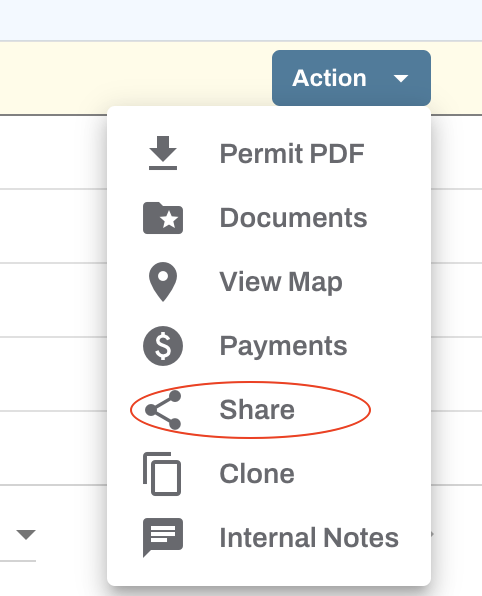
To get started, login to your Oxcart account, locate the permit in question, click the Action button and select Share.
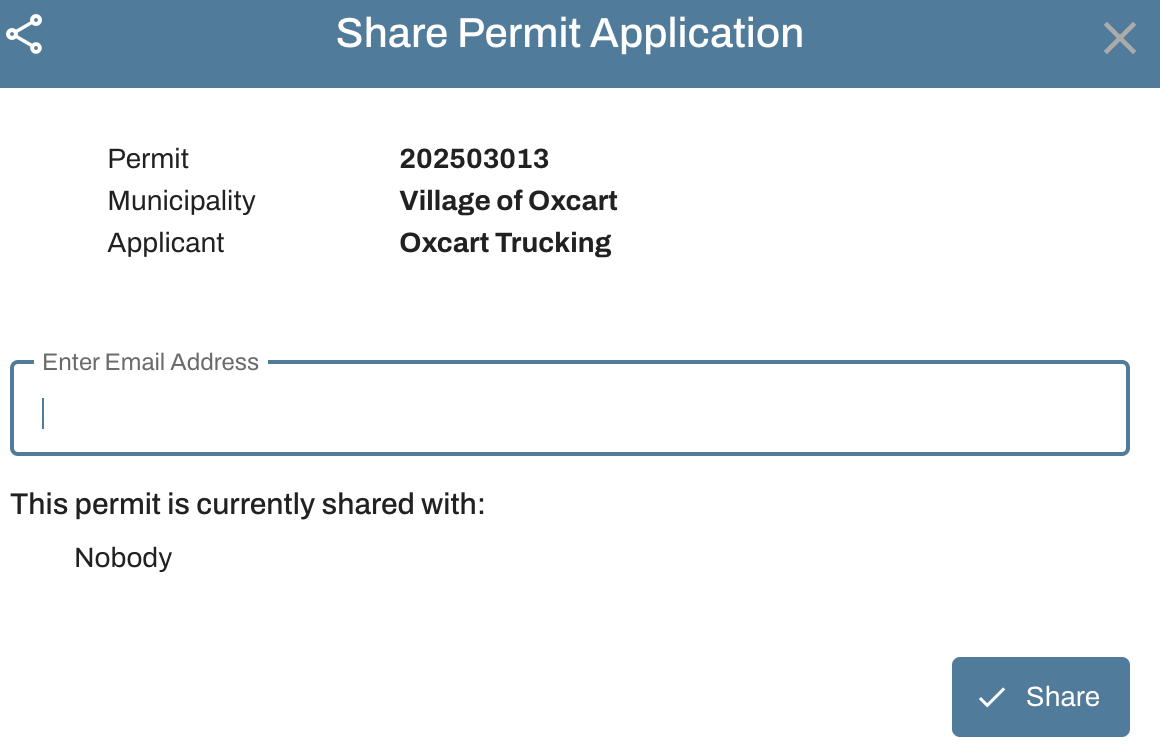
A flyout will open for you to enter the email address of the user you would like to share your permit with. Enter their email address and click Share Permit. You can share with applicant or municipal users, but their email address must be confirmed in Oxcart. You may share with as many users as you need.
Shared permits will appear in the Shared Permits table at the bottom of the user's dashboard. The user to whom the permit was shared may need to refresh their dashboard in order to access the shared permit.
For the permit owner, shared permits will be indicated by the share icon flag directly to the left of the Action button.

You can stop sharing at any time by selecting Share from the Action drop down menu, and clicking the trash can icon next to the email address.
AVAILABLE ACTIONS ON SHARED PERMITS:
User can view the shared permit pdf.
User can access and add documents.
User can request inspections (if enabled for that municipality).
User can pay for shared permits.
User can submit notifications for shared permits (if enabled for that municipality).
NOTE: Users that are already linked to the applicant account do not need individual permits shared with them, as they already have access to the dashboard. To learn more about linking non-account access users, click here.