

Easily manage route notifications (aka “route approvals”) for blanket permits, limited continuous operation permits, or seasonal permits from your dashboard.
After the base permit is approved, applicants can submit a Route Notification (RN) via the Action menu on that permit.
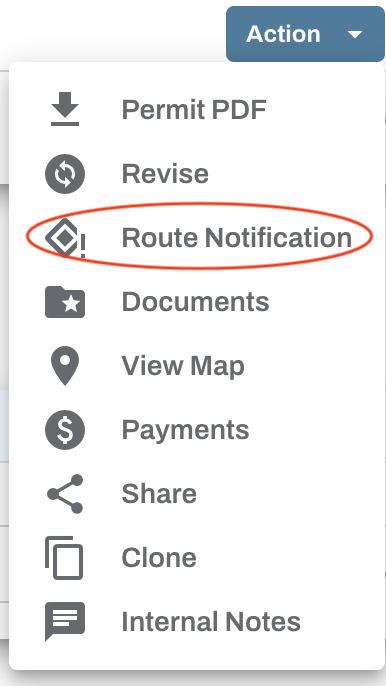
The original application will open with most fields locked, allowing the applicant to enter the intended route details and submit it for approval.

Upon submission, a notification will be sent in the same manner as any permit application (via email or text message or both).
Municipal users will find the submitted RN within the Pending Applications table on their dashboard. The original permit number will be followed by "-RN" next to the applicant’s name. Click the Action menu and select Approve/Deny to open.

Review the RN the same way you would any permit application, then click Approve or Deny.
When approved, the applicant will receive an email notification and the approved RN will appear in the Approved Permits table on the dashboard. The RN receives a sequential suffix added to the original permit number (first RN = -RN1, second = -RN2, etc.).
If denied, you must enter a reason. The applicant will be notified and the RN will be moved to the Denied Applications table on the dashboard.
There is no limit to the number of RNs that can be submitted to the original permit. View the full RN thread by clicking the Revisions (REV) icon for that permit.


IMPORTANT INFORMATION ABOUT ROUTE NOTIFICATIONS:
Route notifications can only be submitted for permit types where that option is enabled.
Route notifications are free; applicants will not be charged.
Route notifications default to 7 days valid but that can be changed.
For fixed end dates, the expiration time defaults to 12:00 AM on the day after the listed date. For example, if the expiration date is 03/15, the RN expires at 12:00 AM on 03/16. Enter expiration dates in MM/DD format.
For permits specified by a number of valid days, no time is shown. The permit remains valid for the full count of days, including the effective date; for example, a 14‑day permit effective 03/12 expires on 03/25.
If you have any questions about Route Notifications, please reach out to support@oxcartpermits.com