Oxcart allows an unlimited number of users on your account so you can easily keep track of all permits. There are several levels of user permissions available that allow for full account privileges and view only privileges. Applicant administrators and managers are able to add additional users to the account.
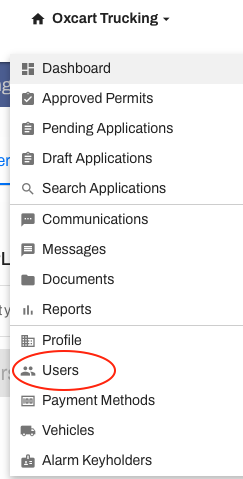
Add users to your account in a few easy steps. Hover over your account menu and select Users from the dropdown menu to get started.
Click Add User to get started.

Complete the onscreen fields and be sure to select the permission settings for any applicable permit modules. See below for an overview of the available permission levels.
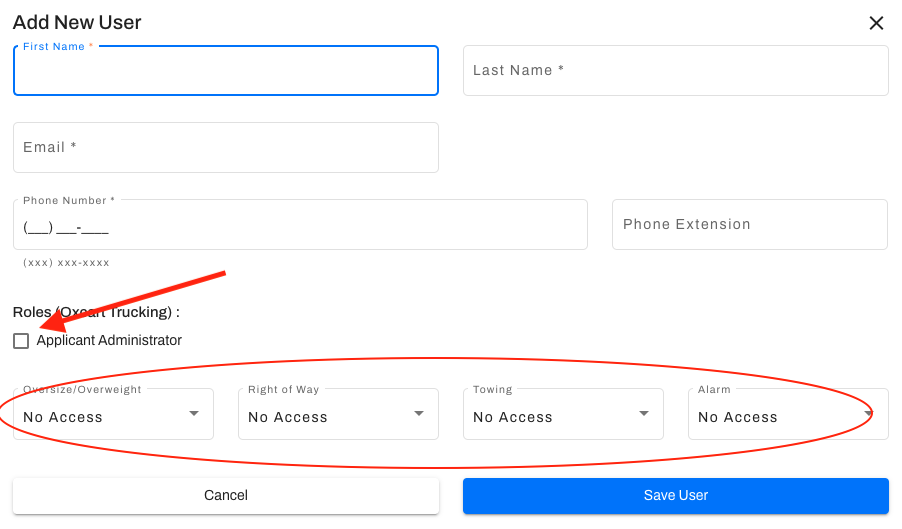
PERMISSION LEVEL OPTIONS:
Applicant Administrator
Full account access
Applying for permits, editing applications, initiating revisions, submitting notifications, sharing and cloning permits
Full access to dashboard, search features, reports, account profile, communications settings, editing users, payment methods, inspections, messages, alarm key holders (if applicable), vehicle and document libraries
Downloading and paying for permits
Applicant Manager
Applying for permits, editing applications, initiating revisions, submitting notifications, sharing and cloning permits
Full access to dashboard, search features, reports, account profile, communications settings, editing users, payment methods, inspections, messages, alarm key holders (if applicable), vehicle and document libraries
Downloading and paying for permits
Applicant User
Applying for permits, editing applications, initiating revisions, submitting notifications, sharing, and cloning permits
Accessing and adding permit documents, but not the full document library
Full access to dashboard, search features, messages, inspections, and reports
Downloading and paying for permits. Can use a saved credit card, but full credit card details are hidden.
View only access to the account profile, communication settings, users, and alarm key holders (if applicable)
No access to view saved payment methods or vehicle library
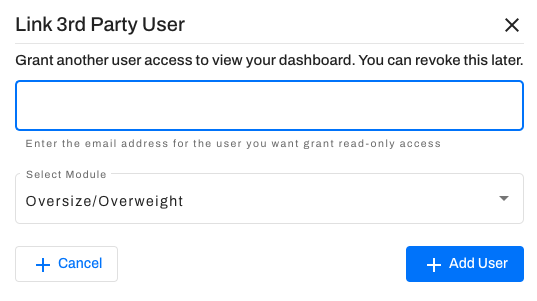
An email address can only be associated with one Oxcart account. If you would like to give a user on another account access to see your permits you may use the Non-Account Access option. This access may only be granted to an email address currently listed as a user within Oxcart. Non-Account Access is a view-only access, but does allow for submission of Route and Work Notifications on approved permits. Users with non-account access to another account may also pay for permits in that account. This type of access does NOT allow applying for new permits.