

If the municipality requires notification when a vehicle has been successfully repossessed, you will need to acknowledge that during the initial application process and submit tow notifications.

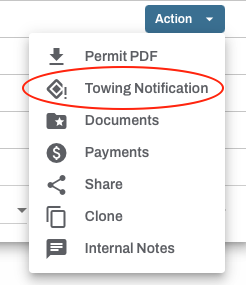
To get started, login to your Oxcart account and locate the approved repossession permit from your dashboard. Click the Action button and select Towing Notification. This will launch an application with the base permit displayed for reference. All visible fields need to be completed, specifically the date and time the vehicle was repossessed. Application fields can vary by municipality.
IMPORTANT INFORMATION ABOUT TOW NOTIFICATIONS:
Not all towing permits require tow notifications. For specific towing questions, please contact the municipality directly.
Tow notifications are free of charge.
Tow notifications are indicated by the original permit number followed by -TN1.
Tow notification permits can be found by clicking on the REV icon next to the Action button.
